It's pretty common in the indie web to have a /guestbook, a little corner where visitors can leave a message for others to read. I'd been meaning to add one for a while, but I wanted something that felt native to the site: no external service pages, and styling that wouldn't clash with the rest of the site.
Integrating Chattable #
Chattable turned out to be a nice fit. Once you make an account, it gives you an iframe snippet that drops straight into your page. I just created a /guestbook route, tossed the snippet into it, and initialized Chattable with my own stylesheet:
<script>
  chattable.initialize({ stylesheet: "/css/chattable.css" });
</script>
That was basically it, the guestbook showed up right away.
Theming the iframe #
Styling iframes is usually a headache, but Chattable has a nice escape hatch: you can pass in a single CSS file during initialization.
The trickier part was theming. My site uses a data attribute on the element to store user preferences: theme, font stack, font size... But the iframe doesn't inherit those. I couldn't just poke into its DOM and patch things up.
My solution: pre-generate a CSS file for every possible combination of preferences and point Chattable to the right one.
In practice that means: theme × font-stack × font-size which generates NaN CSS files.
Not something I'd ever do by hand. Instead, I added a beforeBuild function in Eleventy that spits them out for me. Whenever I change a theme file, the CSS set rebuilds and the guestbook stays in sync with the rest of the site.
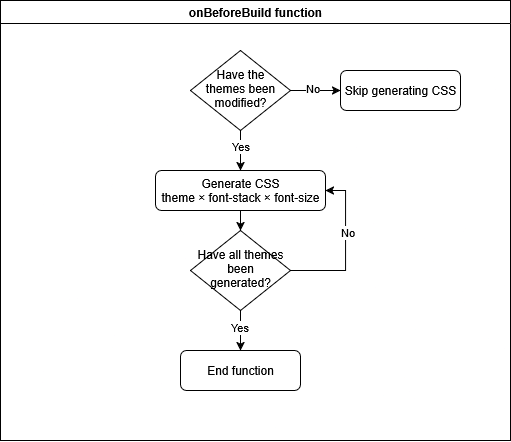
You can check out the full implementation here.
Then I just needed to point Chattable to the correct CSS file:
<script>
  const theme =
    document.documentElement.dataset.theme ||
    (window.matchMedia && window.matchMedia("(prefers-color-scheme: dark)").matches ? "dark-blue" : "grayscale");
  const stack = document.documentElement.dataset.fontStack || "system-ui";
  const size = document.documentElement.dataset.fontSize || "standard";

  chattable.initialize({ stylesheet: `/css/chattable/${theme}-${stack}-${size}.css` });
</script>
Handling required Javascript #
The guestbook won't run without JavaScript. That's fine, but I still wanted to handle it gracefully.
By default, I hide the guestbook:
#chattable {
  display: none;
}
Then I only show it if JS is available:
document.querySelector("#chattable").style.display = "block";
And for folks with JS disabled, I added a fallback message with <noscript>:
<noscript>
  This guestbook is provided by <a href="https://iframe.chat/">Chattable</a>, and requires JavaScript to run. If you
  want to leave a comment enable Javascript, or <a href="/contact">contact me through other channels</a>!
</noscript>
This way, the page still makes sense even if the interactive part can't load.
Wrapping up #
Getting the guestbook up and running wasn't hard. The bigger challenge was making sure it blended in with the rest of the site. Chattable handled most of the heavy lifting, and a little build-script trickery took care of the theming edge cases.
For now, it feels like a natural extension of the site, not an add-on. Which is exactly what I wanted.
So the guestbook's open. Leave a note, a doodle, a hello. It's all part of the fun.